Simple Linux sequential IO benchmark:
# dd if=/dev/zero of=tempfile bs=1M count=1024 conv=fdatasync,notrunc
1024+0 records in
1024+0 records out
1073741824 bytes (1.1 GB) copied, 13.3236 s, 80.6 MB/s
1024+0 records in
1024+0 records out
1073741824 bytes (1.1 GB) copied, 13.3236 s, 80.6 MB/s
# echo 3 > /proc/sys/vm/drop_caches <- clear the buffer-cache
# dd if=tempfile of=/dev/null bs=1M count=1024
1024+0 records in
1024+0 records out
1073741824 bytes (1.1 GB) copied, 4.00297 s, 268 MB/s
# dd if=tempfile of=/dev/null bs=1M count=1024
1024+0 records in
1024+0 records out
1073741824 bytes (1.1 GB) copied, 0.169713 s, 6.3 GB/s
1024+0 records in
1024+0 records out
1073741824 bytes (1.1 GB) copied, 0.169713 s, 6.3 GB/s
Simple CPU benchmark:
dd if=/dev/random bs=1M count=1024 | md5sum
dd if=/dev/random bs=1M count=1024 | md5sum
Linux random IO benchmarks:
1. Flexible IO tester - http://freecode.com/projects/fio
This examples uses Fusion IO cards...The following benchmarks are designed for maximally stressing the system and detecting performance issues, not to showcase the ioMemory device's performance.
# Write Bandwidth test
$ fio --name=writebw --filename=/dev/fioa --direct=1 --rw=randwrite --bs=1m --numjobs=4 --iodepth=32 --direct=1 --iodepth_batch=16 --iodepth_batch_complete=16 --runtime=300 --ramp_time=5 --norandommap --time_based --ioengine=libaio --group_reporting
# Read IOPS test
$ fio --name=readiops --filename=/dev/fioa --direct=1 --rw=randread --bs=512 --numjobs=4 --iodepth=32 --direct=1 --iodepth_batch=16 --iodepth_batch_complete=16 --runtime=300 --ramp_time=5 --norandommap --time_based --ioengine=libaio --group_reporting
# Read Bandwidth test
$ fio --name=readbw --filename=/dev/fioa --direct=1 --rw=randread --bs=1m --numjobs=4 --iodepth=32 --direct=1 --iodepth_batch=16 --iodepth_batch_complete=16 --runtime=300 --ramp_time=5 --norandommap --time_based --ioengine=libaio --group_reporting
# Write IOPS test
$ fio --name=writeiops --filename=/dev/fioa --direct=1 --rw=randwrite --bs=512 --numjobs=4 --iodepth=32 --direct=1 --iodepth_batch=16 --iodepth_batch_complete=16 --runtime=300 --ramp_time=5 --norandommap --time_based --ioengine=libaio --group_reporting
The sample IOPS test uses a 512b block size and 4 threads, with an ioDepth of 128. The sample bandwidth test
uses 1MB block size. For multi-card runs, IOPS are calculated by adding the per-card results together. See the following section for sample output from each of the tests and how to validate that your system is performing properly.
uses 1MB block size. For multi-card runs, IOPS are calculated by adding the per-card results together. See the following section for sample output from each of the tests and how to validate that your system is performing properly.
2. Veritas vxbench
3. Intel IOmeter - http://www.iometer.org/
4.IOzone - http://www.iozone.org/
Fusion IO - Verifying Linux System Performance
To verify an ioMemory product's performance in a Linux system, we
recommend using the fio benchmark. fio is included in many distributions, or
may be compiled from source. The latest source distribution is always linked to
from http://freecode.com/projects/fio,
and compiling requires having thelibaio development headers in place. For step-by-step instructions
on compiling fio from source, seeCompiling FIO
Benchmark Tool
We recommend using raw block
access to test the raw performance of the ioMemory device. The best way to
verify system performance is to run the fio jobs shown below.
 |
WARNING:
Note that the write tests will destroy any data that currently reside on the device. |
 |
Use driver
stack 2.1 or later for best performance.
|
Running fio Tests (Linux)
There are four fio tests that are
typically run when benchmarking. It is important to run them in the order
specified below when benchmarking, as well as ensuring that you fio-format the
device before and after running a full set of tests.
1. One-card
write bandwidth
2. One-card
read IOPS
3. One-card
read bandwidth
4. One-card
write IOPS
The following benchmarks are
designed for maximally stressing the system and detecting performance issues,
not to showcase the ioMemory device's performance.
# Write Bandwidth test
$ fio --name=writebw --filename=/dev/fioa --direct=1 --rw=randwrite --bs=1m --numjobs=4 --iodepth=32 --direct=1 --iodepth_batch=16 --iodepth_batch_complete=16 --runtime=300 --ramp_time=5 --norandommap --time_based --ioengine=libaio --group_reporting
# Read IOPS test
$ fio --name=readiops --filename=/dev/fioa --direct=1 --rw=randread --bs=512 --numjobs=4 --iodepth=32 --direct=1 --iodepth_batch=16 --iodepth_batch_complete=16 --runtime=300 --ramp_time=5 --norandommap --time_based --ioengine=libaio --group_reporting
# Read Bandwidth test
$ fio --name=readbw --filename=/dev/fioa --direct=1 --rw=randread --bs=1m --numjobs=4 --iodepth=32 --direct=1 --iodepth_batch=16 --iodepth_batch_complete=16 --runtime=300 --ramp_time=5 --norandommap --time_based --ioengine=libaio --group_reporting
# Write IOPS test
$ fio --name=writeiops --filename=/dev/fioa --direct=1 --rw=randwrite --bs=512 --numjobs=4 --iodepth=32 --direct=1 --iodepth_batch=16 --iodepth_batch_complete=16 --runtime=300 --ramp_time=5 --norandommap --time_based --ioengine=libaio --group_reporting
The sample IOPS test uses a 512b
block size and 4 threads, with an ioDepth of 128. The sample bandwidth test
uses 1MB block size. For multi-card runs, IOPS are calculated by adding the
per-card results together. See the following section for sample output from
each of the tests and how to validate that your system is performing properly.
Sample Benchmarks, Expected Results Display for Linux
|
Make sure to
run the system-vetting tests in the order they are displayed below. The
initial write bandwidth test may need to be run twice with a short pause
between the runs to setup the card for best performance. Again, the following
benchmarks are designed for maximally stressing the system and detecting
performance issues, not to showcase the ioMemory device's performance.
|
Write Bandwidth Test on Linux
|
WARNING:
Note that the write tests will destroy any data that currently resides on the device. |
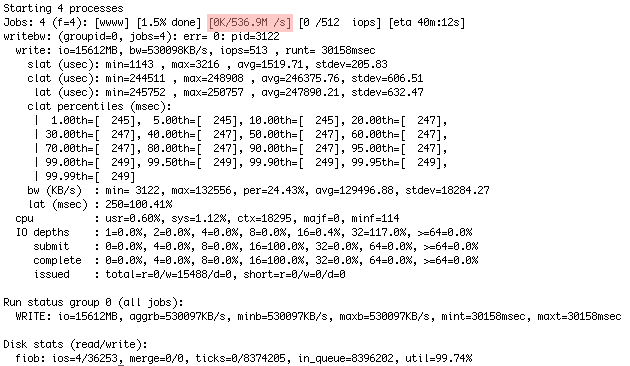
The output below shows the test
achieving 536.9 MB/sec, with random writes done on 1MB blocks. Results are
highlighted in red.
Read IOPS Test on Linux
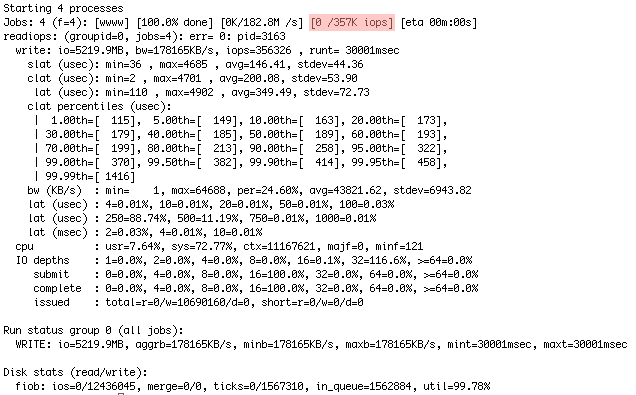
The output below shows the test
achieving 233K IOPS, with random reads done on 512b blocks. Results are
highlighted in red.
Read Bandwidth Test on Linux
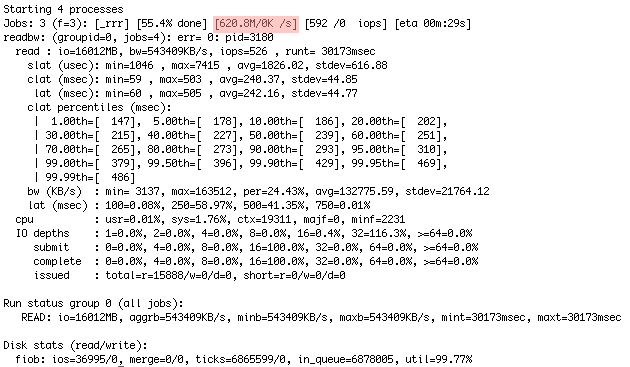
The output below shows the test
achieving 620.8 MB/sec, with random reads done on 1MB blocks. Results are
highlighted in red.
Write IOPS Test on Linux
|
WARNING:
Note that the write tests will destroy any data that currently resides on the device. |
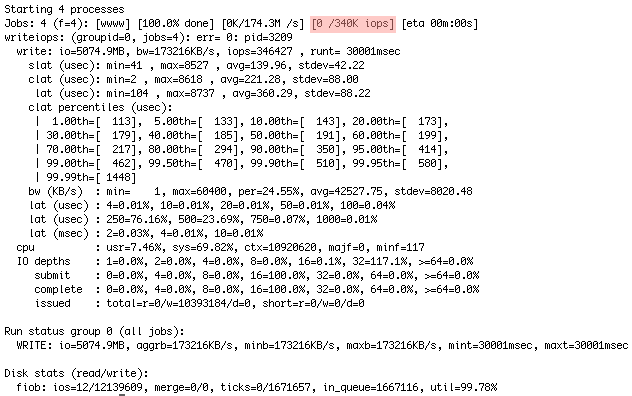
The test below achieved 340K
IOPS, with random writes and a 512b block size. Results are highlighted in
red.
Update 10/6/2015 - See my Linux benchmark Cloudbench:
http://blog.zorangagic.com/2015/06/cloudbench.html
Linux stress tool:
https://www.cyberciti.biz/faq/stress-test-linux-unix-server-with-stress-ng/
sudo yum install stress
stress -c 2 -i 1 -m 1 --vm-bytes 128M -t 10s -v
Where,
- -c 2 : Spawn two workers spinning on sqrt()
- -i 1 : Spawn one worker spinning on sync()
- -m 1 : Spawn one worker spinning on malloc()/free()
- --vm-bytes 128M : Malloc 128MB per vm worker (default is 256MB)
- -t 10s : Timeout after ten seconds
- -v : Be verbose
No comments:
Post a Comment